Smart Return
Smart Return hands back the thread you were holding: what you were doing, the note you left, and exactly what will reopen. Under it is one list of everything waiting on you.
When it appears
- On its own, when you come back from a break. It shows the thread you were in before you left.
- On its own, when you have drifted far from the thread you were on, so you can get back to it.
- Whenever you ask. Press ⌥⌘R from anywhere, or click Smart Return in the tray.
The panel sits at the bottom right of your screen. It never takes your keystrokes, so you can keep typing where you were. To stop it appearing after breaks, turn off Settings → Nudges → Smart Return; ⌥⌘R still works.
The card: where you left off
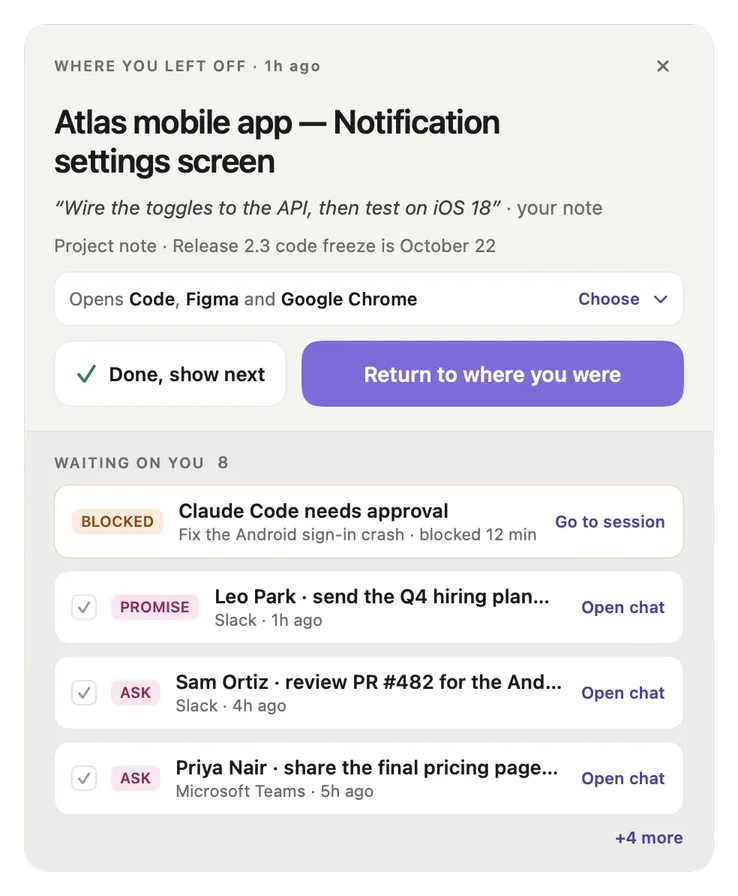
- Where you left off, and how long ago. The card's heading.
- Close (×). Closes the panel. Nothing opens and nothing changes.
- The thread. The project and the thread you were in.
- Your note. The line you left with ⌥⌘B, in quotes. With no note, the card shows the question you left open, or a short summary of the work.
- Project note. The newest note you left on this project, such as a deadline. "+N" means there are more.
- Opens …, Choose. Exactly what Return will reopen: apps, tabs, files and coding-agent chats. Click Choose to see the list and untick anything.
- Done, show next. Marks this thread finished and shows the next note you left, or All clear.
- Return to where you were. Reopens everything that is ticked, in one click, and brings the item you were last on to the front.
- Waiting on you, with a count. Everything waiting on you, in the same order as the tray.
- BLOCKED. A coding agent that needs your approval. Go to session takes you to its tab and closes the panel.
- PROMISE. Something you said you would do. Open chat takes you to the conversation. Tick the box when it's done.
- ASK. Something a person asked you for, with the app and how long ago. Same actions as a promise.
- +N more. Opens the rest of the list.
Choosing what comes back
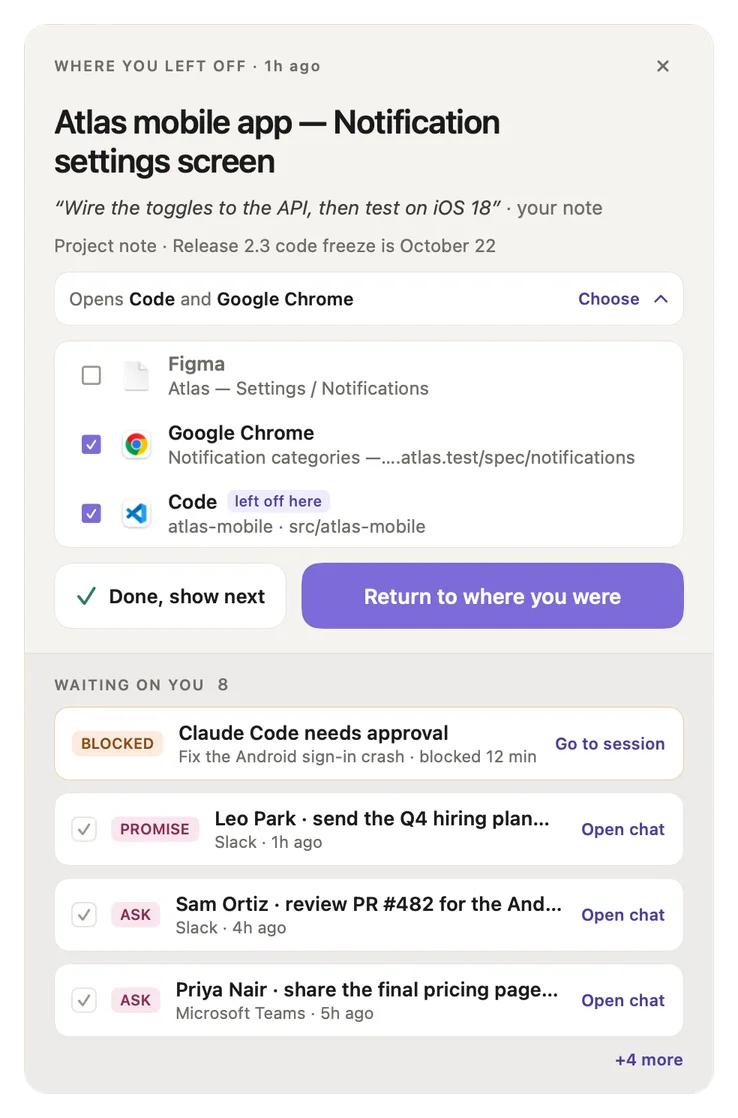
- Opens line. Updates as you tick and untick. Here Figma is unticked, so it reads "Opens Code and Google Chrome".
- Choose. Click again to fold the list away.
- Unticked item. Won't reopen. Each row shows the app and what exactly it reopens (a file, a page, a folder).
- Ticked items. Will reopen. Everything starts ticked every time; Recall doesn't remember your choices.
- left off here. The item you were last on. It comes to the front after everything else opens.
- Return to where you were. Reopens exactly the ticked items. With nothing ticked, it is switched off.
While Recall is still working out what to reopen, the line reads "Finding what to reopen…". If you click Return before it finishes, Recall waits and then reopens everything. If there is nothing to reopen, the card says so and Return opens the thread's page instead.
Next up
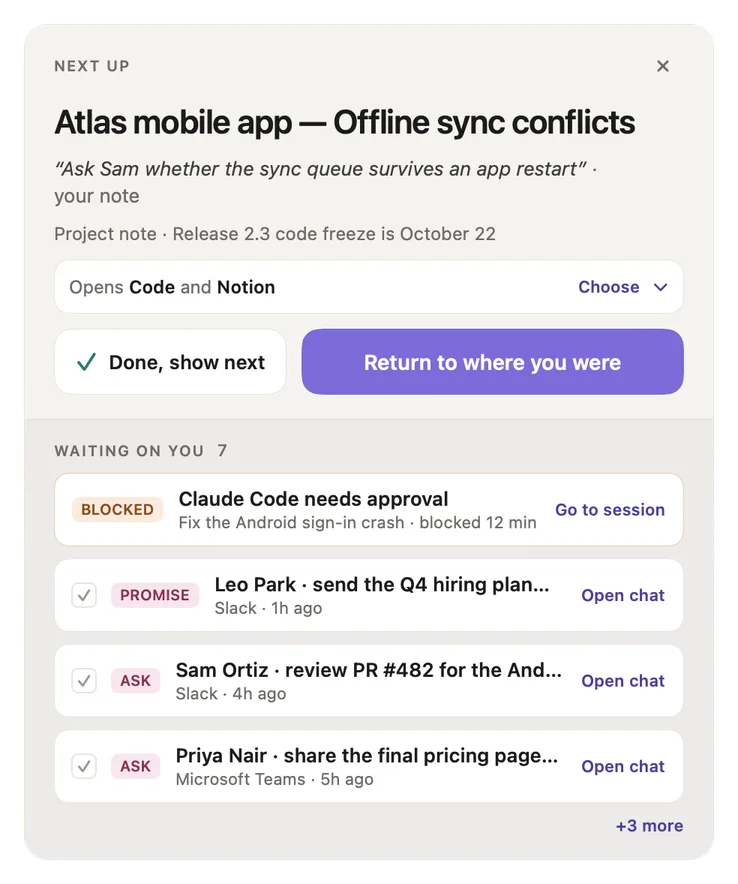
- NEXT UP. After Done, show next, the card moves to the next thread you left a note on, however old the note is.
- That thread's note. What you told yourself to do next.
- What it will open. Its own list of apps, ready for Return.
- The list stays. The waiting list is still below, one shorter.
All clear
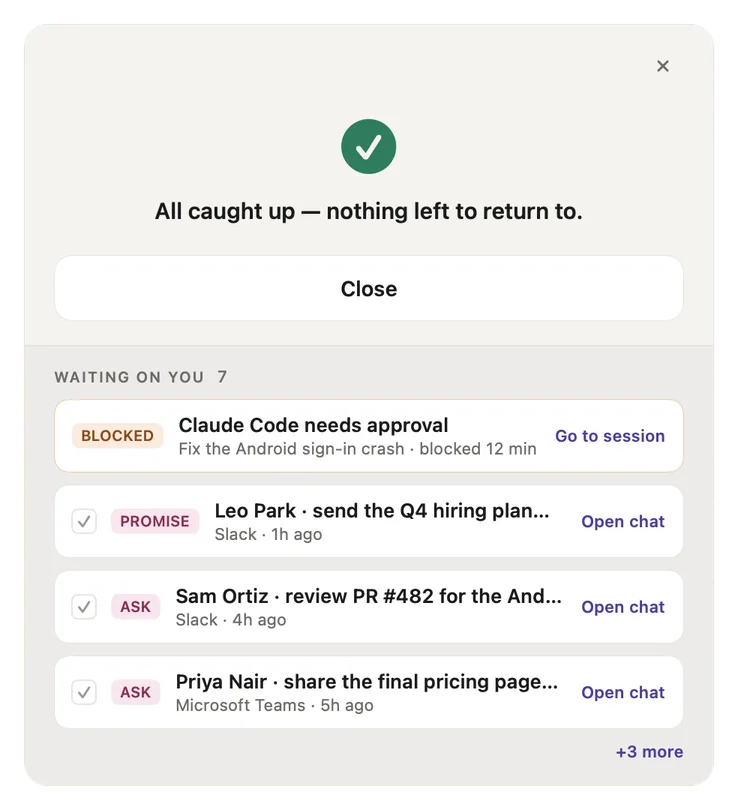
- All caught up. There are no more notes to return to.
- Close. Closes the panel.
- Still waiting. People and agents that are still waiting stay listed. All clear only replaces the card.
The Waiting on you rows
Every row has one action. The order is always the same as the tray's.
| Tag | What it is | Its action |
|---|---|---|
| BLOCKED | A Claude Code or Codex session stopped to ask for your approval. | Go to session |
| ASK | Someone asked you for something in a chat. | Open chat, or tick it done |
| PROMISE | You said in a chat that you would do something. | Open chat, or tick it done |
| AGENT | A coding agent finished its turn and is waiting for you. | Go to session |
| YOUR NOTE | Another thread you left a note on. | Return to it puts that thread on the card. It doesn't open anything yet. |
Screenshots show a fictional demo day. All people, projects and messages are made up.