Everything Recall does, one subscription.
A 30-day free trial, then $14 a month, or $9 a month billed yearly. Every feature in one plan, cancel anytime.
No card to start · Cancel anytime · 7-day refund
- Follows your work by itself
- Your day, in the menu bar
- Smart Return, one click back
- Loops, for what is still open
- 1 connected device
- All future updates
- Locked-in early pricing
- Captured content stays on your Mac
- Apple Silicon (M1+), macOS 14+
What happens after you install.
- SetupFive short steps, two macOS permissions
- DownloadRecall Core, about 1.9 GB. Setup asks first
- Within the hourYour first threads
- TonightYour whole day
- TomorrowSmart Return, after a break
What you may stop paying for.
The trackers, planners and to-do lists people buy to hold the day.
Keep them if you plan or bill in them: Recall doesn't plan your day or make invoices. It sits next to the tools you work inside, such as Notion, Figma, Linear, Slack and VS Code, and brings you back to them: the exact browser tab, the VS Code workspace, and other apps such as Figma and Slack just open. Lowest individual prices, billed annually, from each product's site in November 2026.
- Todoist ProTo-do listfrom $5 / mo
- SunsamaDaily plannerfrom $17 / mo
- RescueTimeTime trackerfrom $7 / mo
- RizeAI time trackerfrom $10 / mo
- TimingMac time trackerfrom $9 / mo
Recall is live on AppSumo. Pay once. While the campaign lasts.
What people ask before they subscribe
What does Recall cost?
One plan with everything in it. $14 a month, or $9 a month billed annually as $108 a year, which saves 36%. Every subscription starts with a 30-day free trial and includes 1 connected device.
Is there a free trial?
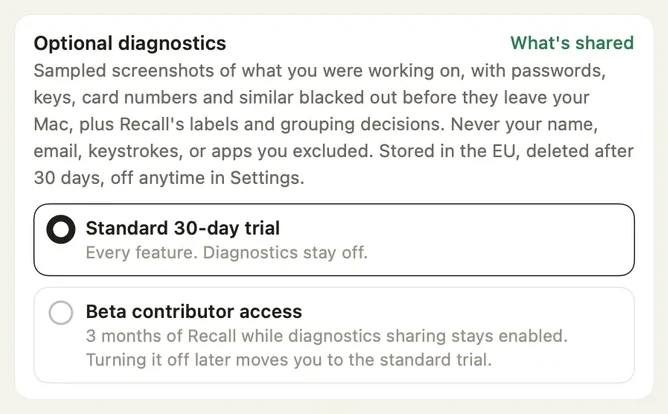
Yes. Recall starts with a 30-day free trial with every feature, and no card is needed to start. Setup asks for an email for your licence. You are only billed if you keep it. Pick beta contributor access during setup, which turns on diagnostics sharing and helps us improve Recall Core, and you get three months instead, for as long as sharing stays on. Settings → Subscription shows the days left.
What is included in the plan?
The full Recall app, running on Recall Core, our own model, entirely on your Mac. Your day in the menu bar, Today as a timeline, Smart Return with a ticked list of what every return will reopen, notes with , Loops with the tasks from your chats and the Claude Code and Codex sessions waiting on you, gentle drift reminders, and answers from our team inside the app. All future updates are included, and early subscribers keep this price along with anything we add at this tier.
Why one price instead of tiers?
So every subscriber gets every feature. One plan, $14 a month or $108 a year, with no seats, no add-on features and no upsell prompts inside the app. The only extra is a device slot, if you run Recall on a second Mac at the same time.
How many Macs can I use?
Your subscription covers 1 Mac. You can move the licence to another Mac from your account, but your history stays on the old Mac, because nothing syncs between Macs. Need Recall on a second Mac at the same time? Add a device slot from your account, and cancel it anytime.
Is there a lifetime deal?
Yes, on AppSumo while the campaign lasts: pay once and keep Recall for life, with future updates. Tier 1 is $49 for 1 Mac, Tier 2 is $99 for 3 Macs and Tier 3 is $199 for 5 Macs. Activate within 60 days of buying. AppSumo purchases follow AppSumo's own 60-day refund.
Is there a team plan?
No. Recall is one plan for one person on one Mac: no seats and no team view. Each person runs their own copy, and their work history stays on their own Mac.
What does Recall need on my Mac?
A Mac with Apple silicon (M1 or newer) and macOS 14 or later, two permissions (Screen Recording and Accessibility), and a one-time download of about 1.9 GB for the on-device AI. Setup asks before it downloads anything.
What about Windows?
Not yet. Recall runs on Macs with Apple silicon (M1 or newer) and macOS 14 or later. Windows is on the public roadmap under Exploring, with no date yet. Join the Windows waitlist on the site and we will email you when it is ready.
Can I cancel any time?
Yes. In Recall, Settings → Subscription → Manage… signs you in to your account, where cancelling takes one click. Your local data stays on your Mac after you cancel. Settings → Data → Forget history deletes it, and Uninstall… removes the app, your data and the AI model.
What is your refund policy?
Every charge is covered by a 7-day money-back guarantee, for any reason, on monthly and annual plans alike. Billing and refunds are handled by Paddle, our Merchant of Record. The full policy lives at joinrecall.com/refunds.
Do you have a referral program?
Yes: give a month, get a month. Verify your email once and your personal invite link waits in your Recall account, under Invite friends. Your friend downloads through it and trials Recall free, and when they subscribe you both get one month of Recall free. It stacks: every paid friend is another free month. Details at joinrecall.com/invite.
Where can I ask questions or share feedback?
In the app, choose Send Feedback… from the ⋯ menu in Recall's menu bar tray to report a problem or suggest a feature, and our reply comes back right there, under Conversations. The official community is r/joinrecall on Reddit, and a smaller Telegram group sees new builds first. Or email hello@joinrecall.com and we answer directly.