Going back to work
Every way back to a thread shows what it will open before anything opens: a row in the tray, Resume in Loops, Return to session on a thread page, Recall me on a reminder, and Open chat on an ask. Smart Return shows the same list inside its card. Everywhere else, you see the restore checklist.
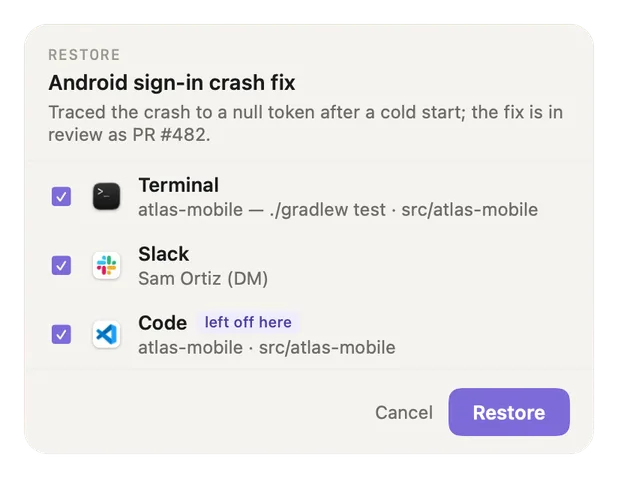
- Restore, the thread and its summary. Which thread you are going back to, and what it was about.
- One row per item. Each app with what it will reopen, all ticked. Untick anything you don't need.
- left off here. The item you were last on. It opens last, so it ends up in front.
- Cancel. Opens nothing and changes nothing. Pressing Esc or closing the panel does the same.
- Restore. Opens only the ticked items, then brings "left off here" to the front. If you unticked it, the last ticked item comes to the front instead.
Restoring also clears a "saved for later" mark on the thread. If a thread has nothing Recall can reopen, the checklist is skipped and you see the thread's page instead (or, for an ask, the chat app).
What each app restores
| App | What comes back |
|---|---|
| Chrome, Safari, Arc, Firefox, Brave, Edge | The tab you were on. Only that tab, not every tab that happened to be open. |
| VS Code, Cursor, Windsurf | The workspace folder you were in. |
| JetBrains IDEs | Your project, through the IDE's recent projects, or the IDE itself. |
| Xcode | The file you had open. |
| Terminal, iTerm2 | A new window in the folder you were working in. |
| Obsidian | The vault and the note. |
| Claude Code, Codex | The exact chat you had open (see below). |
| Figma, Slack and other apps | The app opens and comes to the front. You pick the file or channel yourself. |
Your coding-agent chats come back too
If you looked at a Claude Code or Codex chat while you worked on a thread, going back brings that chat back, not just the editor or terminal it ran in. Recall lists up to three such chats, newest first.
- A chat and the editor window it lives in show as one row, for example "Claude chat (VS Code)". Untick the row and neither opens.
- A Claude Code chat you had closed is reopened in VS Code or Cursor.
- A Codex conversation opens where it runs: in the Codex app, or in VS Code for the extension, not in a new terminal.
- Recall never opens a second terminal next to the one already running your chat.
Screenshots show a fictional demo day. All people, projects and messages are made up.