Asks and promises
When someone asks you for something in Slack, Microsoft Teams, Telegram, WhatsApp or Mail, or you reply that you will do it, Recall notices it on your screen and keeps it as a task. It shows up the same day in Loops, in the tray's Waiting line, on every Smart Return, and in Owed on Today. Message text never leaves your Mac, except in a bug report you choose to send with diagnostics sharing on, which can include screenshots and any text you add.
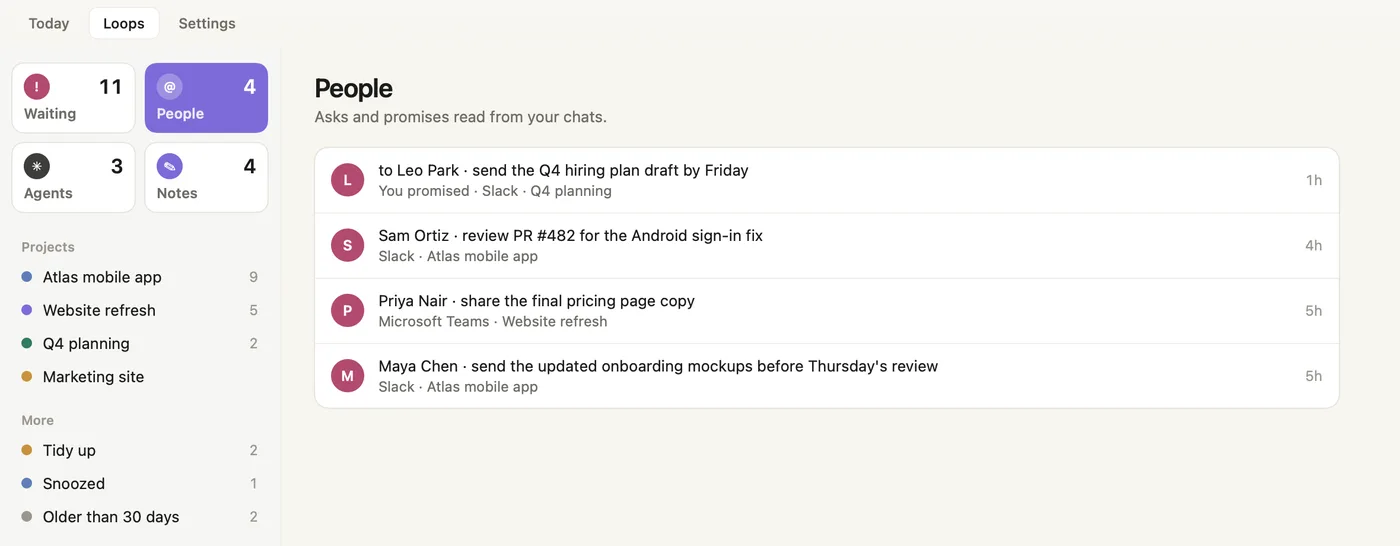
- People. Every open ask and promise read from your chats, newest first.
- Promise. "to Leo Park" and "You promised": something you said you would do.
- Ask. The person, what they asked, the app and the project.
- Other apps. Asks from Microsoft Teams and other chat apps sit in the same list.
What you can do with an ask
- Open chat shows what it will reopen and takes you back to the conversation. If there is nothing to reopen, the chat app comes to the front.
- Tick it done on Smart Return, or choose Done in Loops.
- Snooze it until tonight, tomorrow or next week.
- Not a commitment removes something Recall misread.
- When Recall kept a picture of the chat, a small thumbnail on the row shows the chat as it was on screen. Recall keeps it only while the ask is open.
How Recall keeps the list honest
- The same ask, said twice or reworded, stays one row. When the conversation updates it, the row updates.
- Activity and notification feeds (such as Slack's Activity view) are ignored, so a reaction to an old message never becomes a new ask.
Reminders
If an ask sits unanswered, Recall may remind you with a quiet card (see Nudges and reminders). Reminders are capped: at most once a day for each ask, never more than one an hour, never for something asked today while you are still in that conversation, and older asks only every few days. Snoozing an ask holds its reminders until it wakes.
Filing a person's asks under a project
Choose Move to project… on an ask. Recall files it there, carries that person's other open asks in the same app along, and files their new asks there too. The same name in another app is treated as a separate conversation.
Screenshots show a fictional demo day. All people, projects and messages are made up.