Local-first, encrypted at rest
Capture and grouping run on your machine. The local store stays on your device, with no cloud sync behind it. What leaves the device is opt-in, scoped, and visible to you.
Recall watches the shape of your work on screen, never your microphone or camera. Local-first, encrypted at rest, no third parties, no training on your work. Pause and forget at any time.
Priya is evaluating Recall before installing it on her work laptop. The product looks useful, but one question comes first: what does it see, what stays local, and what can she delete?
If a tool watches my screen, I want a straight answer before I let it in.
Tell me what Recall sees. Then let a second opinion stress-test the claim.
That is why we make the privacy model readable. You can ask any AI assistant to review the claims, find gaps, and tell you what still needs proof.
Use the prompt below to have ChatGPT, Claude, or Perplexity review Recall’s published privacy claims.
This reviews our published privacy architecture, not proprietary implementation code.
Capture and grouping run on your machine. The local store stays on your device, with no cloud sync behind it. What leaves the device is opt-in, scoped, and visible to you.
Recall reads what you can see on screen across tabs and apps. It never opens the microphone, the camera, or the system audio. No voice, no calls, no video.
No third party receives your work content. Zero analytics SDKs, zero tracking pixels, zero ad networks. We do not sell, share, or syndicate your context.
Your sessions are not used to train any model, ours or anyone else's. The patterns Recall learns about your day stay scoped to you.
One toggle pauses capture. Uninstall Recall and everything it stored locally is deleted with it. Forgetting never needs our permission.
Recall is for the person doing the work. There is no team-wide view of who opened what or for how long. Surveillance is not a feature.
If your team or your legal review needs the boring details, here they are. No asterisks, no enterprise-only carve-outs. The defaults are the policy.
You have the right to access, export, or delete every byte Recall holds about you, on demand and without friction. Data minimization is the default, not a setting.
California residents can request a full export or full deletion at any time. We do not sell personal information, full stop, in any state.
The Recall store lives on your device and nowhere else. There is no cloud sync and no server copy to breach, subpoena, or leak.
No third party receives your work content. Providers used for basics like app distribution, payments, email, hosting, or licensing do not receive the context of your work. AI features run against your own provider key, or against a local model.
Six layers, each with a one-line scope. If you are reviewing Recall for your team, paste this into your AI of choice and ask it the hard questions. The answers should not require us in the room.
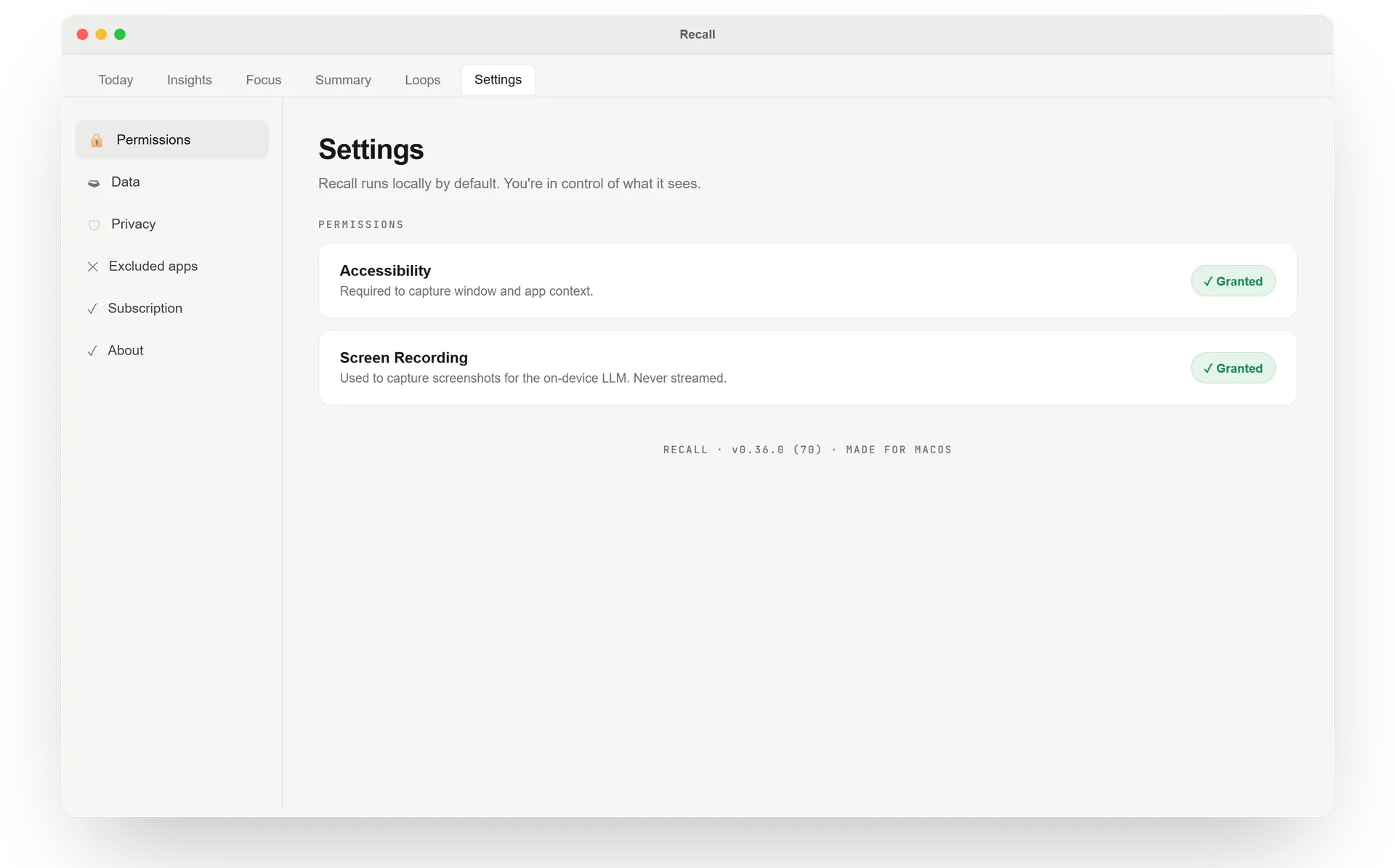
Two permissions, both visible and revocable. Recall runs locally by default, and nothing about that is buried three menus deep.
Capture, grouping, and the patterns Recall learns about your day all run on your device. The boundary below is the one we will not cross without you.
There is no work content to clone, leak, or delete from our side. Your history lives on your machine and leaves with the app if you uninstall it.
Metadata can still be sensitive. That is why Recall keeps the useful signal narrow, local by default, and visible to you.
App names, window or document titles, URL domains and stems, time-on-task, switching patterns, and context labels you confirm or correct.
No microphone audio, camera, system audio, keystrokes, clipboard contents, passwords, payment fields, 2FA fields, or raw screen recordings.
Nothing. Recall has no cloud sync and no online storage. The one exception is telemetry you choose to attach to a bug report, and sensitive data is redacted from it before it is sent.
Pause capture at any time, correct the context labels Recall builds, and uninstall to delete everything it stored. Your history never outlives the app.
Work contentThe actual contents of your work: message bodies, email bodies, documents, calls, voice, video, passwords, payment details, or raw screen content.
Session metadataThe minimal structure Recall uses to help you return: app and window context, rough timing, switching patterns, and labels you approve.
On your machine. Everything Recall captures is stored locally on your device. There is no cloud sync and no online storage, so your work history never leaves your machine. Uninstall Recall and the data goes with it.
Never. Recall only reads what is already visible on your screen across tabs and apps. The microphone, the camera, and system audio are never touched. Voice and video are out of scope by design.
No raw screen recordings are stored. Recall is designed to keep the work signal narrow: app and window context, timing, switching patterns, and labels you confirm. Any temporary processing is discarded and is not kept as history.
We do not use analytics SDKs or tracking pixels. The only telemetry we receive is what you choose to send with a bug report, and sensitive data is redacted from it before it leaves your machine.
Yes to both. Because your work history lives only on your device, the personal data we hold comes down to your account and billing record. You can request access, export, or deletion of it at any time, and we do not sell personal information in any jurisdiction.
No third party receives your work content. Providers used for basics like app distribution, payments, email, hosting, or licensing do not receive the context of your work. AI features that require a model run against your own provider key or against a local model.
No. There is no team-wide dashboard, no manager view, no leaderboard. Recall is built for the person doing the work, not for someone watching them.
Everything Recall captures stays on your machine, so a sensitive title never leaves your device. Redaction happens in one place: when you send a bug report, sensitive data is stripped from the telemetry before it reaches us. Private and incognito windows are currently captured like regular ones, so tap pause when you want no history at all.
Yes. Pause Recall at any time, and uninstall it to delete everything it stored. Your history exists in exactly one place, your machine, so removing the app removes the data with it.
No. We do not use your work to train anything, ours or anyone else's. The patterns Recall learns about your day stay scoped to your device.